Showing posts with label in. Show all posts

Saturday, March 25, 2017

Error executing updater binary in zip fix

Error executing updater binary in zip fix


Error executing updater binary in zip [fix]


fixed twrp
Many of us have their hobbies to flash different Rom(s) available one by one depending on the mood, same as I do. But recently while flashing Miui v6 on Xiaomi Redmi 1s, it gave me this
"Error executing updater binary in zip" error in the recovery while flashing as shown in the given image. Now after this error you cant boot back obviously as you wiped everything before the flashing.
Lots of people misinterprets thinking that it is encountered because of the Rom they had downloaded & flashed on their devices might be the wrong one, but its not like that. Ive seen this error mostly with the Team Win Recoveries(TWRPs) , so let me help you with this thing step by step that how you can avoid this error and get your device flashed properly.
So lets begin,

What all we need before flashing any Rom?

1. A complete nandroid backup of the Rom that was running on the device.

2. You can backup your Rom in the recovery under the backup option. It will create a backup of your whole system on your external SD card.

3. If you failed to create the backup of the Rom or you dont have the backup and the error occurred, then at least you should have the zip file of any working custom Rom of your device in the storage (external/internal).

Now lets suppose Rom1 as the stock Rom(or any working custom Rom of your device) and Rom2 will be the Rom that you flashed and got the error.

Our common steps for flashing any custom Rom(s) are,

Step 1:- Go to recovery.

Step 2:- Go to Wipe>>Advanced wipe.

Step 3:- Check data, system, cache & dalvik cache and then swipe to wipe all.

Step 4:- Then go to install zip from SD card and browse the Rom and install it.

Step 5:- Reboot the device.

Same as the above steps I flashed the Rom on the device and encountered the error in the recovery. So what I did to flash the Rom2 correctly after the error was,

Step 1:- I flashed the Rom1 again by the same methods followed above.

Step 2:- Then  without following Step 2 & Step 3 (that is not wiping the data & system from the Advanced wipe).

Step 3:- I just only did the factory reset & the dalvik cache wipe instead, from the Wipe menu.

Step 4:- After that flashed the Rom2 which gave me the updater binary error before and it got flashed completely without the error.

Step 5:- Then I rebooted the device and it booted on the system successfully.

Update: You can just only hit the "Factory Reset" before flashing the ROM to pass the error instead.
Also make sure that you are using the latest version of TWRP recovery available for your respective devices.

Thats it, if still the error stays then maybe the issue will be of the ROM only what you are flashing, but this method worked for me. As complete system wipe sometimes leads to the flashing error. Still you are getting the error again and again then stay relaxed and comment below I will work for you and find the solution for your device asap when Ill get time.

Good luck. Stay connected


Available link for download

Read more »

Wednesday, March 22, 2017

EmguCV and Getting the Right Libraries in the Right Places!

EmguCV and Getting the Right Libraries in the Right Places!


Some quick hints for now, and hopefully Ill fill this in more later : )

If you see the exception "The type initializer for Emgu.CV.CvInvoke threw an exception." then you need to dig deeper to figure out what actually happened.  View details of the exception and drill down into the InnerException until you get to the bottom.  Youll probably find one of these...

Exception: Probable Cause
"An attempt was made to load a program with an incorrect format." : You are compiling for 32-bit but the OpenCV library you are using was compiled for 64-bit.  Or the other way around.

"Unable to load DLL opencv_core240: The specified module could not be found" : The core240 DLL is not in the same folder as your executable...or if you do have it there then you might need to install (or reinstall) The Microsoft Visual C++ 2010 redistributable package of the latest Service Pack (SP1 is current as of this writing).  x86: http://www.microsoft.com/en-us/download/details.aspx?id=8328  x64: http://www.microsoft.com/en-us/download/details.aspx?id=13523

Still having trouble loading the core240?  Use the great Dependency Walker tool from http://www.dependencywalker.com/ to open the core240 DLL and see what other DLLs might be missing!


Available link for download

Read more »

Thursday, March 16, 2017

Fix For Some Apps Starting Behind Focused Windows In Ubuntu Compiz

Fix For Some Apps Starting Behind Focused Windows In Ubuntu Compiz


In Ubuntu (w/ Unity), some applications/windows open behind focused windows which can be annoying in some cases. Here are a few examples:
  • clicking the "open containing folder" in the Firefox downloads menu, the file manager pops up behind the focused window;
  • activating applications through indicators doesnt always bring them to the foreground, for instance Pidgin chat windows, the file manager opened via the "Open Dropbox folder" Dropbox AppIndicator menu item, Rhythmbox from the Ubuntu Sound Menu, etc.;
  • if theres already a fileroller window open (Archive Manager, a compress/extract job, etc.), the second window you open is not focused.
I tested the examples above under Ubuntu 15.10 with Unity.

Some focus-related issues were marked as fixed a while back, but some continue to occur and there are comments, as well as bug reports, which suggest a simple solution which should fix this issue: setting "Focus Prevention level" to "Off" in CompizConfig Settings Manager (obviously you need to be using Compiz for this to work).

In case youre not aware, Ubuntu (with Unity) ships with "Focus Prevention level" set to "Low" by default. For instance, to work around this issue, Ubuntu MATE, which allows you to easily switch to Compiz via MATE Tweak, ships with this option set to "Off".

To apply the fix/workaround I mentioned above, firstly install CompizConfig Settings Manager:
sudo apt-get install compizconfig-settings-manager

Then open CompizConfig Settings Manager and under General Options > Focus & Raise Behaviour tab, set "Focus Prevention Level" to "Off":

Compiz focus prevention

Thats it! If later on you decide you want to switch back to the default behaviour, simply set the "Focus Prevention Level" back to "Low".

As a bonus, this also fixes the issue with Nemo (with Unity patches) opening in the background when theres a focused window (which I think is a bug in Nemo).


Available link for download

Read more »

Sunday, March 12, 2017

Free Hindi Movie Downloads In Hd Where Do I Find And Watch Free Bootleg Movies Online

Free Hindi Movie Downloads In Hd Where Do I Find And Watch Free Bootleg Movies Online


Free Hindi Movie Downloads In Hd : Where Do I Find And Watch Free Bootleg Movies Online

Free Hindi Movie Downloads In Hd - these days costs are likely up and too the dollars inside your pocket seems to be disappearingeading for the films ereally single full week is just not an actuality anymore for severalince of this, a growing number of people are looking for free of charge bootleg movies on the Webhile a couple of appear to come across top quality movie downloads several far more are ending up empty-handed or left with virusesnowing in which to appear is 1 means of discovering free bootleg moviesor those who have been unsuccessful at obtaining free of charge bootleg movies read onoull just discover a couple of thing that may well save you several moneyhy are so several men and women left empty-handed when looking for totally free movie downloadshe one factor that numerous people have in Common is the way they are doing a search for themlearly the fairly first thing many people are going to do is type in Google free bootleg movieshe outcomes arrive up, after which whatou ... [Read More @ Free Hindi Movie Downloads In Hd]

Hello there every body if you locate available. Free Hindi Movie Downloads In Hd, In addition to must get hold of a very good 1 people satisfy that with the following, We have Super deals for goods, In our Web page It is possible to read testimonials through authentic consumers and look at Price ranges Comparision before you decide to acquire along with uncomplicated. We have been Guarantee you may recieve a low cost costs or maybe Rapid Transport intended for Here is Download Total Films


Free Hindi Movie Downloads In Hd > Here is Download Total Films

Free Hindi Movie Downloads In Hd : Where Do I Find And Watch Free Bootleg Movies Online

Here is Download Total Films Free Hindi Movie Downloads In Hd - Which is it! Begin Watching All Your Motion pictures on Your Pc,Smartphone or Television Set! The Film Archive is Consistently Updated With More Movie Titles From the Classics to New DVD Releases! No set up or extra hardware Necessary! You do not need to have to be computer seasoned to download and watch videos from our site.

Hi everyone if you locate available. Free Hindi Movie Downloads In Hd, In addition to have to purchase a beneficial just one an individual meet up with the item throughout right here, We now have Great deals pertaining to items, In this Website You possibly can examine testimonials coming from authentic shoppers and check Costs Comparision prior to buy together with effortless. I am Ensure you may recieve a new low cost prices or Swift Shipment intended for Here is Download Total Films


Perhaps You want to information of :
myMoviePass - No1. Source for Movies Online!
ImoviesClub Legal Movie Downloads - Download Full Movies & Watch
Instantly Stream Unlimited Full Movies directly to your PC or
Online Movies - Download Full Movies

Latest news videos : Free Hindi Movie Downloads In Hd


Popular Search : free hindi movie downloads in hd


Available link for download

Read more »

Saturday, February 25, 2017

Fix Dropbox Indicator Icon And Menu Not Working In Xubuntu Lubuntu Or Ubuntu MATE

Fix Dropbox Indicator Icon And Menu Not Working In Xubuntu Lubuntu Or Ubuntu MATE


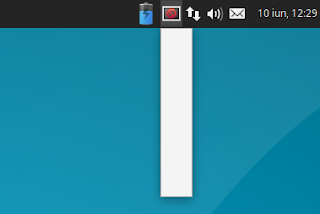
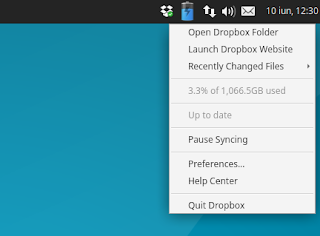
I recently stumbled on an issue with Dropbox and the Ubuntu flavors that support AppIndicators (except Unity), like Xubuntu and Lubuntu: the Dropbox AppIndicator icon shows up as broken and the menu doesnt work. This isnt a new issue though, and it seems to occur starting with Ubuntu 14.04.

The issue occurs with the Dropbox packages in the official Ubuntu repositories (called "nautilus-dropbox", which doesnt depend on Nautilus and can be used to install Dropbox on any desktop environment) as well as the Dropbox package downloaded from its official website. 

It does not occur with the caja-dropbox package available in the official Ubuntu MATE 16.04 repository though (but it does occur in older Ubuntu MATE versions if youve enabled AppIndicators), because it was patched with a fix similar to the one in this article.

Below youll find a fix / workaround for this issue. Important: using the instructions below, Dropbox will use a tray (notification area) icon instead of an AppIndicator.

Heres a screenshot with the issue (taken in Xubuntu 16.04):


And another screenshot taken after using the fix below:


Tested in Xubuntu 16.04, Xubuntu 14.04, Lubuntu 16.04, Ubuntu MATE 16.04 (the issue does not occur with the caja-dropbox package in this Ubuntu MATE version) and Ubuntu MATE 14.04.

To fix it, you need to add "dbus-launch" before the actual command for the "Exec" line in both the application autostart file and launcher. For Dropbox this is a bit tricky because it overwrites any modifications to its autostart file. So heres what you need to do to fix this Dropbox issue:
  • if youve installed Dropbox by downloading the .deb from its website or by using the nautilus-dropbox package from the repositories:
    • rename the Dropbox autostart file, located in ~/.config/autostart/, and edit the file, changing the "Exec" line to "Exec=dbus-launch dropbox start -i";
    • copy the Dropbox desktop file, located under /usr/share/applications/, to ~/.local/share/applications/, so its not overwritten when updating the package, and change the "Exec" line to "Exec=dbus-launch dropbox start -i"
    • disable the built-in Dropbox autostart (because it automatically creates an autostart file) using the "dropbox autostart n" command.
  • for the caja-dropbox package (except for Ubuntu MATE 16.04 which doesnt have this issue):
    • rename the dropbox-caja autostart file, located in ~/.config/autostart/, and edit the file, changing the "Exec" line to "Exec=dbus-launch caja-dropbox start -i";
    • copy the caja-dropbox desktop file, located under /usr/share/applications/, to ~/.local/share/applications/, so its not overwritten when updating the package, and change the "Exec" line to "Exec=dbus-launch caja-dropbox start -i";
    • disable the built-in Dropbox autostart (because it automatically creates an autostart file) using the "caja-dropbox autostart n" command.

This sounds a bit complicated on a first look, right? Well, its not, but to make it easier, you can use the following commands to apply the changes I mentioned above.

If youve installed Dropbox by downloading the .deb from its website or by using the nautilus-dropbox package, you can fix the broken Dropbox appindicator icon and menu by using the following commands:
cp ~/.config/autostart/dropbox.desktop ~/.config/autostart/start_dropbox.desktop
sed -i s/^Exec=.*/Exec=dbus-launch dropbox start -i/ ~/.config/autostart/start_dropbox.desktop
dropbox autostart n
mkdir -p ~/.local/share/applications/
cp /usr/share/applications/dropbox.desktop ~/.local/share/applications/
sed -i s/^Exec=.*/Exec=dbus-launch dropbox start -i/ ~/.local/share/applications/dropbox.desktop

For Ubuntu MATE (except 16.04), if youve used the dropbox-caja package to install Dropbox, you can fix the broken Dropbox appindicator icon and menu by using the following commands:
cp ~/.config/autostart/caja-dropbox.desktop ~/.config/autostart/start_caja-dropbox.desktop
sed -i s/^Exec=.*/Exec=dbus-launch caja-dropbox start -i/ ~/.config/autostart/start_caja-dropbox.desktop
caja-dropbox autostart n
mkdir -p ~/.local/share/applications/
cp /usr/share/applications/caja-dropbox.desktop ~/.local/share/applications/
sed -i s/^Exec=.*/Exec=dbus-launch caja-dropbox start -i/ ~/.local/share/applications/caja-dropbox.desktop

Then restart the session (logout/login) and the Dropbox icon and menu should work correctly.

via / thanks to: TuxDiary and AskUbuntu


Available link for download

Read more »

Thursday, February 16, 2017

FREE DELL Inspiron 7359 2 in 1 Laptop PC Service Manual PDF File Download

FREE DELL Inspiron 7359 2 in 1 Laptop PC Service Manual PDF File Download


The DELL Inspiron 7359 2-in-1 service manual has been released by DELL at their website. The DELL Inspiron 7359 2-in-1 service manual is provided in PDF document format (94-pages) that you can download directly from DELL website. You can read this DELL Inspiron 7359 2-in-1 service manual by using PDF reader software/application. The DELL Inspiron 7359 2-in-1 service manual contains complete reference information about how to service the DELL Inspiron 7359 2-in-1 laptop PC properly, such as how to replace the keyboard, how to replace the battery, how to replace the hardrive, basic troubleshooting and many more.


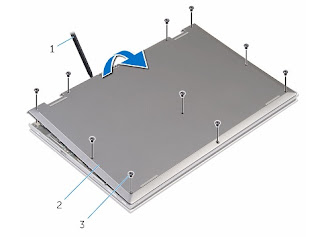
Removing the base cover
Procedure
1  Close the display and turn the computer over.
2  Remove the screws that secure the base cover to the computer base.
3  Using a plastic scribe, pry the base cover away from the computer base.
Removing the base cover


1 plastic scribe 
2 base cover
3 screw


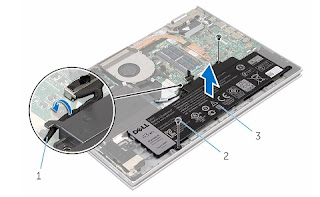
Removing the battery
Procedure
1  Remove the screws that secure the battery to the palmrest and keyboard
assembly.
2  Remove the hard-drive cable from the routing guides on the battery.
3  Lift the battery off the palmrest and keyboard assembly.


1 hard-drive cable 
2 screws (2)
3 battery


4  Turn the computer over.
5  Press and hold the power button for 5 seconds, to ground the system
board.


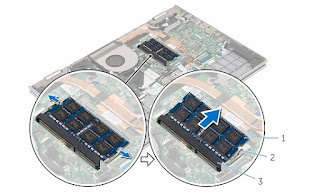
Removing the memory module
Procedure
1  Use your fingertips to carefully spread apart the securing-clips on each
end of the memory-module slot until the memory module pops up.
2  Remove the memory module from the memory-module slot.


1 memory module 
2 securing clips (2)
3 memory-module slot


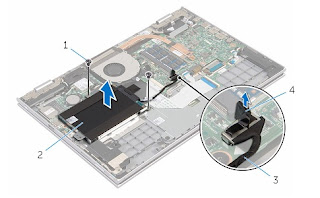
Removing the hard drive
Procedure
1  Remove the screws that secure the hard-drive assembly to the palmrest
and keyboard assembly.
2  Using the pull tab, disconnect the hard-drive cable from the system
board.
3  Lift the hard-drive assembly along with its cable off the palmrest and
keyboard assembly.


1 screws (2) 
2 hard-drive assembly
3 hard-drive cable 
4 pull tab


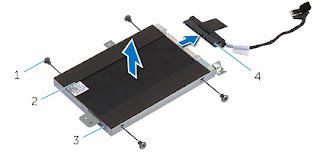
4  Disconnect the interposer from the hard drive.
5  Remove the screws that secure the hard-drive bracket to the hard drive.
6  Lift the hard-drive bracket from the hard drive.

1 screws (4) 
2 hard drive
3 hard-drive bracket 
4 interposer


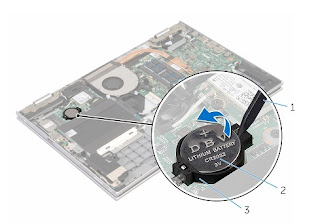
Removing the coin-cell battery
Procedure
Using a plastic scribe, gently pry the coin-cell battery out of the battery
socket on the I/O board.


1 plastic scribe 
2 coin-cell battery
3 battery socket


The following download link is for DELL Inspiron 7359 2-in-1 Laptop PC Service Manual. The service manual is provided by Dell website. The service manual offers comprehensive information about the laptop PC that would be useful for any of you who are using this computer.

For complete DELL Inspiron 7359 2-in-1 Laptop PC Service Manual PDF File, please download here :

Download FREE DELL Inspiron 7359 2-in-1 Laptop PC Service Manual.pdf


Available link for download

Read more »

Tuesday, January 17, 2017

Fastest dual core in the world at 7862 83MHz

Fastest dual core in the world at 7862 83MHz


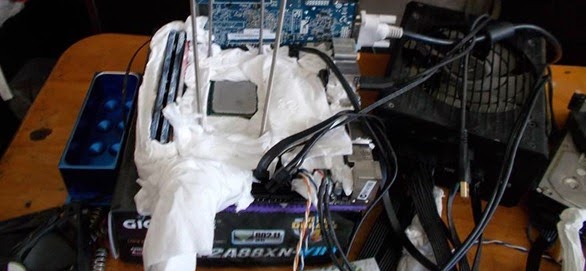
Aussie overclocker Newlife has hit a pretty sweet frequency with a low end, dual core, CPU at 7862.83MHz. He used the GIGABYTE F2A88XN-WIFI board and froze the AMD A6-6420K with liquid nitrogen to hit the big numbers. Awesome stuff, congrats!

Clipboard01sss

10606528_10206505636338818_8302643179612322916_n


Available link for download

Read more »

Thursday, December 22, 2016

Fast Food Business Plan In Kenya How To Buy A Rowing Machine

Fast Food Business Plan In Kenya How To Buy A Rowing Machine


Fast Food Business Plan In Kenya : How To Buy A Rowing Machine

Fast Food Business Plan In Kenya : How To Buy A Rowing Machine : A rowing machine is arguably the correct full-body workout machine you should have in your home todaynyone can use it and it offers an excellent low-impact cardiovascular workout so you wont be placing any unnecessary stress on your jointsnd with the constant pulling and pushing done while rowing, you may build and define muscles in your upper and lower bodyiguring out that buying a rowing machine as a result of the multitude of positive aspects it will provide you is the easy parteeking to narrow down which one to get out of the dozens available on the market today is the difficult parto make things much easier for you, Ill go over the key steps you should follow that will show you how to acquire a rowing machinetep 1 - Determine if you have enough spaceA typical rowing machine requires the same amount of floor space an average two-seat sofa takes up so make certain you have enough spaceont forget that your back and head will be extended past the length of the ... [Read More ! Fast Food Business Plan In Kenya]

Hello many people if you locate out and about. Fast Food Business Plan In Kenya, And ought to purchase a great 1 a person fulfill the item in in this article, We have Super deals with regard to solutions, In our Internet site You are able to go through reviews through true consumers and youll verify Price ranges Comparision prior to invest in using quick. I am Assure you will redeem a new low cost costs or maybe Rapid Shipping intended for Fat Loss four Idiots


Fat Loss four Idiots

Fast Food Business Plan In Kenya : How To Buy A Rowing Machine

Fast Food Business Plan In Kenya : How To Buy A Rowing Machine ! What this signifies is that you can not get slimmer till you Alter your consuming routines to one thing NEW and Different, something which youve by no means tried just before. For example, if you select not to start employing this diet regime and you keep consuming your exact same meals.......then you are going to be caught with the Exact same Entire body permanently. Your body will not adjust all by itself, due to the fact you wont wake up 1 morning and be thinner right up until you Get THAT Very first Step and consider one thing new.

Fast Food Business Plan In Kenya - How To accomplish It! Fat Loss four Idiots ! The particular numerical product or service you would oftimes be for the appearout intended for. It is find out how to undertake it, you must work with it really nicely. In case you are for the seemout with regard to fredgen, you can expect precisely what you need to be mindful with regards to the pleasure assurance as well as money back if you are now not delighted. You should have a show up with the information. .


Perchance You want to Read...
Fat Loss 4 Idiots / Weight Loss and Diet Center
Truth About Six Pack Abs
Fat Loss Factor By Dr. Charles Livingston
The Six Pack Method
The Six Pack Method

Watch the latest Clips : Fast Food Business Plan In Kenya


Popular Search : fast food business plan in kenya


Available link for download

Read more »

Tuesday, December 20, 2016

Fix Large Black Borders Around Header Bar Apps With Some Themes In Ubuntu 15 10 GTK 3 16

Fix Large Black Borders Around Header Bar Apps With Some Themes In Ubuntu 15 10 GTK 3 16


In Ubuntu 15.10 (which uses GTK 3.16), theres a bug which causes some themes, like Numix, to have large black borders.

This bug only occurs for applications that use header bars (client-side decorations) and it affects Ubuntu (with Unity), while Xubuntu, Ubuntu MATE and Ubuntu GNOME dont seem to be affected (at least in my quick test). Update: MATE with Compiz enabled is also affected so I guess any desktop environment under which you use Compiz is affected (thanks to pawelp!).

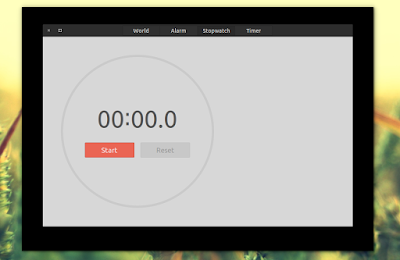
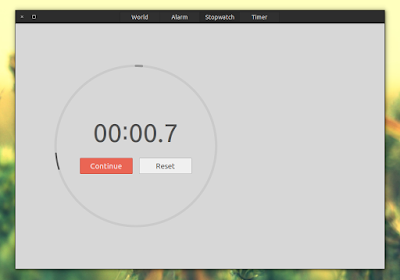
Heres a screenshot with GNOME Clocks (an app that uses header bars) under Unity (Ubuntu 15.10), using Numix GTK theme:

Ubuntu black borders bug

Im not sure when/if this bug will be fixed but until then, you can fix it yourself. Below youll find a simple fix which will remove the black borders no matter what GTK theme youre using.

To fix the large black borders bug in Ubuntu, open ~/.config/gtk-3.0/gtk.css (create the ~/.config/gtk-3.0 folder if it doesnt exist) with a text editor (Ill use Gedit below):
mkdir -p ~/.config/gtk-3.0
gedit ~/.config/gtk-3.0/gtk.css
and in this file, add the following:
.window-frame {
box-shadow: none;
margin: 1px;
}
This forces any theme you use to have a 1 pixel border. You can use any value you want - for instance, use "0" for borderless windows.

Then save the file and close all the applications affected by the black border bug (or you can log out and log back in), then try them again and you shouldnt see large black borders any more.

Heres the same application Ive used above to show the bug (GNOME Clocks, running under Unity), after applying the fix:


Thanks to Phaeilo @ GitHub for the fix!


Available link for download

Read more »

Thursday, November 24, 2016

Enable VNC Server in Mac OS X

Enable VNC Server in Mac OS X


This is so easy I cant believe its taken me this long to find it.  This works for Snow Leopard and Lion as far as I know, though Ive only tested it on Lion.

Go this route:

  • System Preferences
  • Sharing
  • Choose "Screen Sharing" and check the box to turn it on
  • Click "Computer Settings..."
  • Enable the "VNC views may control screen with password:" option and give it a password.  Password length is limited to 8 characters.
Now you can connect to and control your Mac from your favorite VNC application, including free versions like Mocha VNC (Lite) for iPhone or Chicken of the VNC for Mac.  I personally use Mocha VNC and it is a very good VNC app for my casual use.  It is surprisingly fast over my home network Wireless-G iPhone 3GS to Gigabit-connected early-2007 iMac, and it works perfect with my iMacs dual monitor setup.  Its the best Spotify "remote" Ive found yet.


Available link for download

Read more »

Sunday, November 20, 2016

Frequencies used on Maxis network in Malaysia

Frequencies used on Maxis network in Malaysia


If you wonder what type of network use by Maxis Malaysia. See image below.


This is useful information if you need to flash custom kernel. Make sure the kernel support the network type.


For example the different between Sony Experia Z3 model.

Its all about the LTE frequencies
 --
2G Network GSM 850 / 900 / 1800 / 1900 - D6603, D6643, D6653, D6616
  --
3G Network HSDPA 850 / 900 / 1700 / 1900 / 2100 - D6603, D6643, D6653, D6616
 --
4G Network LTE
700/800/850/900/1700/1800/1900/2100/2600 (1/2/3/4/5/7/8/13/17/20) - D6603 LTE 700/800/850/900/1700/1800/1900/2100/2600 (1/2/3/4/5/7/8/17/20) - D6643 LTE
700 / 850 / 900 / 1800 / 2100 / 2600 - D6653
LTE 700 / 1700 / 1900 / 2100 - D6616


Available link for download

Read more »

Saturday, November 12, 2016

Free Drivers HP PSC 1410 All In One Printer Driver Download

Free Drivers HP PSC 1410 All In One Printer Driver Download


HP PSC 1410 All-In-One Printer Driver Download

  • HP PSC 1401
  • HP PSC 1402
  • HP PSC 1403
  • HP PSC 1408
  • HP PSC 1410
  • HP PSC 1410v
  • HP PSC 1410xi
  • HP PSC 1415
  • HP PSC 1417

 Specification

  • Methods: Drop-on-demand inkjet thermal
  • Supported Languages : LIDIL
  • Print Speed-optimized up to 4800 x 1200 dpi/1200 dpi (color)

Copy Specification

  • Fit to page
  • Digital image processing
  • Up to 10 copies of the original
  • Up to 18 copies per minute black 15 copies per minute color
  • Up to 600 x 600 black/Up to (colors) of up to 1200 x 1200 10 ppm  
HP PSC 1410 All-In-One Printer Driver Download

    Operating SystemVersionSizeDownload
    HP Deskjet and Officejet Full Feature Software and Drivers  Windows 8.1/814.8.0326.2MBDownload
    HP Update Software Utility  Windows 8.1/8/7/vista/XP5.005.002.0022.9 MBDownload
    Utility-Diagnostic Tools  HP Printer Install Wizard for Windows 8.1/8/73.12.3 MBDownload
    Utility-Diagnostic Tools  HP Print and Scan Doctor for Windows 8.1/8/7/vista/XP4.76.8 MBDownload
    HP Deskjet and Officejet Full Feature Software and Drivers Windows 713.1.0362.7 MBDownload
    HP Print Software Patch When Upgrading Vista to Windows 71.01.3 MBDownload
    Critical Update: Cannot find scanned image or document files after scanning completes  Windows 7/vista/XP3.028.5 MBDownload
    HP Full Feature Software and Drivers  Windows Vista080.001.237.001163.3 MBDownload
    Application Shop for HP Supplies  Windows Vista/XP (32-bit)14.012.7 MBDownload
    Critical Update to Enhance Reliability of Network and USB Connectivity and Improve System Responsiveness While Printing  Windows Vista2.025.3 MBDownload
    Critical Update to Correct a PC to Printer Communication Issue Windows Vista1.01.6 MBDownload
    HP Officejet and PSC Full Feature Software and Drivers  Windows XP/20005.3.1476.6 MBDownload
    HP Officejet and PSC Basic Driver Windows XP/2000 (32-bit)5.3.171.1 MBDownload
    HP Image Zone/Photo and Imaging Unexpected Internal Error and Communications Failure Patch  Windows XP/2000 (32-bit)1.00.5 MBDownload
    HP All-in-One printing-only web installer for Mac OS X v10.2.8/v10.3/v10.42005091314.3 MBDownload
    Software for HP PSC 1400 Series Mac OS X v10.2.87.7.2109.4 MBDownload
    HP Photosmart, PSC and Officejet Full Feature Software/Drivers -Mac OS X v10.3/v10.4 (Universal) For Asia Pacific Regions9.5186.7 MBDownload
    HP Photosmart, PSC and Officejet Full Feature Software/Drivers Mac OS X v10.3/v10.4 (Universal)9.5186.9 MBDownload
    HP Photosmart Full Feature Software and Drivers Mac OS X v10.3.9/v10.4/v10.59.7174.2 MBDownload
    HP DeskJet, PSC and OfficeJet Full FeatureSoftware and Drivers  Mac OS X v10.610.3131.1 MBDownload
    HP Print Driver for Mac OS X 10.61.0.118.6 MBDownload
    Critical HP Print Driver Update to address printing of an extraneous page Mac OS X 10.6/10.7/10.8/10.91.0.010.6 MBDownload

    Prior to installation, you should check the specifications used device that includes the type of printer and operating system that is used on your Pc and laptop.


    Available link for download

    Read more »

    Saturday, October 22, 2016

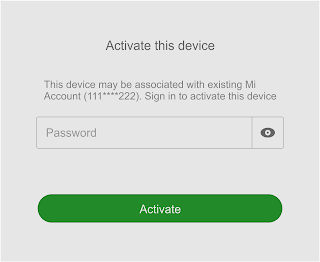
    Fix “ This device may be associated with existing mi account Sign in to activate this device ”

    Fix “ This device may be associated with existing mi account Sign in to activate this device ”


    Yesterday my friend got the above warning in his Xiaomi Redmi 2 Prime. He said he did a hard reset and after boot phone stuck on the Mi Account activate screen. Unfortunately, he doesnt have a Mi account associated with the device to complete the activation.

    We did a hard reset again, no luck still prompt the same warning. Found many recommendations by Googling the issue, but none worked as expected. Finally solved the issue by erase the config on fastboot mode.

    Be aware that by erasing the config you may lose Browser, Chrome, Google, Google Play, etc. You need to install all of them manually.

    Disclaimer - It may brick your device, Do at your risk.

    Here is the complete steps …

    1. Download and extract the ADB_Fastboot.zip - Download
    2. Open CMD then navigate to the extracted folder (Simply open the extracted folder then shift+right click and select Open command window here)
    3. Now boot your phone to fastboot mode (Volume down + Power button)
    4. In fastboot mode connect the phone to computer.
    5. In CMD execute the below commands in the given order

    fastboot -w
    fastboot erase config
    fastboot reboot


    Wait till the phone boots up. That’s it.


    Available link for download

    Read more »