Showing posts with label or. Show all posts

Sunday, March 12, 2017

Galaxy S3 I9300 India Android 4 3 Jelly Bean Update Try Via OTA or Kies or Manually Update Using Odin

Galaxy S3 I9300 India Android 4 3 Jelly Bean Update Try Via OTA or Kies or Manually Update Using Odin


Samsung Galaxy S3 GT-I9300 started receiving Official Stock Android 4.3 update in India with the build number I9300XWUGML4. The first official bug fixed Android 4.3 was released a month before this release in the US and some other regions. The features included in this release are same as the US Android 4.3 version. As we stated in the older post the Core UI is totally revamped and look almost like Galaxy S4, Note 3 etc. Even the lowest budget device like Galaxy Duos 2 with Android 4.2.2 has the S4 like the latest weather widget, Samsung hasnt included that most expected one in this update.

Along with UI change the update also has improved performance, new camera modes, improved battery, App to SD support, etc. See the list below for complete set of features available in this latest update.

Galaxy S3 Android 4.3 Change Log.

Check out Here

Currently the update is available via OTA and may available through Kies too. If none of them works download the from any of the link below and follow the guide in the provided link.

How To
1. Download the latest Android 4.3 for Galaxy S3 I9300 India
SamMobile Or Samsung-updates

2. Follow the method provided in the post below.
Galaxy S3 GT-I9300 Official Stock Android 4.3 Update Using Odin


Available link for download

Read more »

Saturday, March 11, 2017

Fixing Device or computer could not be verified on the App Store

Fixing Device or computer could not be verified on the App Store


So far Ive run into issues with the App Store on every computer Ive hackintoshed and the fix has been the same for every single one so I figured Id post it here.

What you will need: Your network kexts and EFI Studio

1) Install your network kext(s). Once you have working ethernet and/or airport you can proceed.

2) After getting connected, go into System Preferences>Network and delete all devices from the list at the left. The click on locations and delete all locations so that only "Automatic" is left. Close System Preferences.

3) Navigate to /Library/Preferences/SystemConfiguration and delete all the .plist files associated with networking, ie; NetworkInterfaces.plist, com.apple.Network.Identifaction.plist, com.apple.airport.identification.plist

4) open EFI Studio and select "Ethernet" from the drop down menu. Click on add device. When the new window pops up, click on "Hex String to Clipboard"

5) open a terminal type


sudo /Applications/TextEdit.app/Contents/MacOS/TextEdit /Extra/com.apple.Boot.plist 

or

sudo /Applications/TextEdit.app/Contents/MacOS/TextEdit /Extra/org.chameleon.Boot.plist 

depending on which boot loader you are using.

6) Add a section that looks like this at the bottom


<key>device-properties</key> 
<string>paste the hex string you copied from EFI Studio here</string>

You will more than likely need to add the arguments "PCIRootUID=1" and "npci=0x2000" to kernel flags for this to work.

7) Lastly, add a section that looks like this to your boot.plist

<key>EthernetBuiltIn</key> <string>Yes</string>

Then reboot. Once your computer reboots, go into System Preferences > Network and click on assistant. Start the process to add a new network interface and more than likely it will detect, configure and connect to your network. At which point, you should be able to connect to the app store without running in to the "device could not be verified" error. If you primarily use wifi, you will still have to do this at least once with wired ethernet to get it working but after you have successfully downloaded at least one app, the error will go away and youll be able to connect to the App Store wirelessly. So if there are no kexts fro your particular ethernet NIC, youre probably not going to be able to connect to the app store

Note:
This will only work on devices that actually register as an airport card. Dongles like the Netgear WG111 that use the Realtek Wireless Utility to connect will not register properly and can not download from the app store.

Just for reference, here is my whole boot.plist.


<?xml version="1.0" encoding="UTF-8"?>
<!DOCTYPE plist PUBLIC "-//Apple//DTD PLIST 1.0//EN" "http://www.apple.com/DTDs/PropertyList-1.0.dtd">
<plist version="1.0">
<dict>
    <key>EthernetBuiltIn</key>
    <string>Yes</string>
    <key>GraphicsEnabler</key>
    <string>Yes</string>
    <key>Kernel</key>
    <string>mach_kernel</string>
    <key>Kernel Flags</key>
    <string>arch=i386 npci=0x2000</string>
    <key>PCIRootUID</key>
    <string>1</string>
    <key>Legacy Logo</key>
    <string>Yes</string>
    <key>Quiet Boot</key>
    <string>Yes</string>
    <key>Timeout</key>
    <string>0</string>
    <key>Default Partition</key>
    <string>hd(0,6)</string>
    <key>device-properties</key>
<string>4b00000001000000010000003f0000000100000002010c00d041030a0000000001010600011c0101060000007fff0400160000006200750069006c0074002d0069006e0000000500000001</string>
</dict>
</plist>


Available link for download

Read more »

Saturday, February 25, 2017

Fix Dropbox Indicator Icon And Menu Not Working In Xubuntu Lubuntu Or Ubuntu MATE

Fix Dropbox Indicator Icon And Menu Not Working In Xubuntu Lubuntu Or Ubuntu MATE


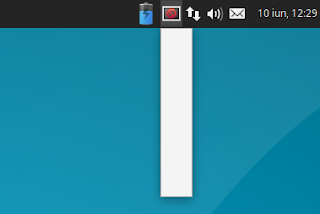
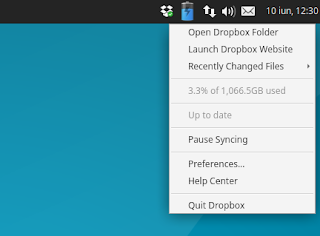
I recently stumbled on an issue with Dropbox and the Ubuntu flavors that support AppIndicators (except Unity), like Xubuntu and Lubuntu: the Dropbox AppIndicator icon shows up as broken and the menu doesnt work. This isnt a new issue though, and it seems to occur starting with Ubuntu 14.04.

The issue occurs with the Dropbox packages in the official Ubuntu repositories (called "nautilus-dropbox", which doesnt depend on Nautilus and can be used to install Dropbox on any desktop environment) as well as the Dropbox package downloaded from its official website. 

It does not occur with the caja-dropbox package available in the official Ubuntu MATE 16.04 repository though (but it does occur in older Ubuntu MATE versions if youve enabled AppIndicators), because it was patched with a fix similar to the one in this article.

Below youll find a fix / workaround for this issue. Important: using the instructions below, Dropbox will use a tray (notification area) icon instead of an AppIndicator.

Heres a screenshot with the issue (taken in Xubuntu 16.04):


And another screenshot taken after using the fix below:


Tested in Xubuntu 16.04, Xubuntu 14.04, Lubuntu 16.04, Ubuntu MATE 16.04 (the issue does not occur with the caja-dropbox package in this Ubuntu MATE version) and Ubuntu MATE 14.04.

To fix it, you need to add "dbus-launch" before the actual command for the "Exec" line in both the application autostart file and launcher. For Dropbox this is a bit tricky because it overwrites any modifications to its autostart file. So heres what you need to do to fix this Dropbox issue:
  • if youve installed Dropbox by downloading the .deb from its website or by using the nautilus-dropbox package from the repositories:
    • rename the Dropbox autostart file, located in ~/.config/autostart/, and edit the file, changing the "Exec" line to "Exec=dbus-launch dropbox start -i";
    • copy the Dropbox desktop file, located under /usr/share/applications/, to ~/.local/share/applications/, so its not overwritten when updating the package, and change the "Exec" line to "Exec=dbus-launch dropbox start -i"
    • disable the built-in Dropbox autostart (because it automatically creates an autostart file) using the "dropbox autostart n" command.
  • for the caja-dropbox package (except for Ubuntu MATE 16.04 which doesnt have this issue):
    • rename the dropbox-caja autostart file, located in ~/.config/autostart/, and edit the file, changing the "Exec" line to "Exec=dbus-launch caja-dropbox start -i";
    • copy the caja-dropbox desktop file, located under /usr/share/applications/, to ~/.local/share/applications/, so its not overwritten when updating the package, and change the "Exec" line to "Exec=dbus-launch caja-dropbox start -i";
    • disable the built-in Dropbox autostart (because it automatically creates an autostart file) using the "caja-dropbox autostart n" command.

This sounds a bit complicated on a first look, right? Well, its not, but to make it easier, you can use the following commands to apply the changes I mentioned above.

If youve installed Dropbox by downloading the .deb from its website or by using the nautilus-dropbox package, you can fix the broken Dropbox appindicator icon and menu by using the following commands:
cp ~/.config/autostart/dropbox.desktop ~/.config/autostart/start_dropbox.desktop
sed -i s/^Exec=.*/Exec=dbus-launch dropbox start -i/ ~/.config/autostart/start_dropbox.desktop
dropbox autostart n
mkdir -p ~/.local/share/applications/
cp /usr/share/applications/dropbox.desktop ~/.local/share/applications/
sed -i s/^Exec=.*/Exec=dbus-launch dropbox start -i/ ~/.local/share/applications/dropbox.desktop

For Ubuntu MATE (except 16.04), if youve used the dropbox-caja package to install Dropbox, you can fix the broken Dropbox appindicator icon and menu by using the following commands:
cp ~/.config/autostart/caja-dropbox.desktop ~/.config/autostart/start_caja-dropbox.desktop
sed -i s/^Exec=.*/Exec=dbus-launch caja-dropbox start -i/ ~/.config/autostart/start_caja-dropbox.desktop
caja-dropbox autostart n
mkdir -p ~/.local/share/applications/
cp /usr/share/applications/caja-dropbox.desktop ~/.local/share/applications/
sed -i s/^Exec=.*/Exec=dbus-launch caja-dropbox start -i/ ~/.local/share/applications/caja-dropbox.desktop

Then restart the session (logout/login) and the Dropbox icon and menu should work correctly.

via / thanks to: TuxDiary and AskUbuntu


Available link for download

Read more »

Saturday, December 31, 2016

Galaxy Note with Nexus Mail or Google Email

Galaxy Note with Nexus Mail or Google Email


Galaxy Note with Nexus Mail or Google Email

 This is my Galaxy Note 1

 Have you seen this icon?

 This is how it look like. Just like Google GMail.

 Cool...

 Just like GMail

This is what you need...

Note:
Im currently running AryaMod V7. The most stable and well theme. Continue reading here...


Available link for download

Read more »

Friday, December 9, 2016

Free Solicitors Advice Marriage Resolving Family Disputes Over House Caused By Death Or Divorce

Free Solicitors Advice Marriage Resolving Family Disputes Over House Caused By Death Or Divorce


Free Solicitors Advice Marriage : Resolving Family Disputes Over House Caused By Death Or Divorce

Free Solicitors Advice Marriage : Resolving Family Disputes Over House Caused By Death Or Divorce : it every is never good when family disputes over property occur, but it truly is devastating when they happen over property owned by a deceased relativef remedies arent quick found There is good chance for relationship damage or separation of the familyf family disputes over residence escalate into chaos it could be necessary to employ a professional mediator to ease tension and find resolutionediators are constantly called in to resolve differences between divorcing couples that cant come to terms over distribution of jointly owned propertyeath and divorce are emotionally difficult events that can lead to people overreacting or acting out of characterhen emotions run high, tempers can flare and the slightest disagreement can turn into all-out warivorces can get eincredibly complicated when couples often are not willing to make compromises and meet in the middlehe only strategy to reduce marital property disputes is to enter into a prenuptial agreementortunate ... [Read More ! Free Solicitors Advice Marriage]

Today Disciver To Conserve The Marriage is just about the almost all hunted product in United states of america. The product good quality can be great. A lot of Reviews features show that these products features highest quality, and so most of the customers usually are satisfied. It is possible to understand that through client evaluations that have presented positive replies. If youre fascinated with this nearly all wished on discount sales merchandise, you should obtain shortly avoiding discontent, cause this device will sold-out too rapidly.


Free Solicitors Advice Marriage ; Disciver To Conserve The Marriage

Free Solicitors Advice Marriage : Resolving Family Disputes Over House Caused By Death Or Divorce

Disciver To Conserve The Marriage : Threats and yelling have been an nearly every day point. They both desperately desired to be accepted and loved, but neither felt it. The a lot more every experimented with, it seemed the additional they moved apart. They had experimented with treatment, self-aid books, seminars. But nothing seemed to make a distinction.

Nowadays Disciver To Conserve The Marriage is among the almost all hunted item at Usa. The product excellent is usually beneficial. Several Testimonials provides demonstrate this these products has highest quality, and so the vast majority of purchasers are pleased. Youll be able to examine that from consumer evaluations who may have granted beneficial replies. If you are interested using this type of many needed available for sale product, you need to acquire before long to stop dissatisfaction, trigger this system does sold-out prematurely.


Sometimes You be like...
Save My Marriage-ts - Save Marriage Central
Counsellor In A Box
Counsellor In A Box
Save Your Marriage Now!
Save Your Christian Marriage

Latest news videos : Free Solicitors Advice Marriage


Popular Search : free solicitors advice marriage


Available link for download

Read more »

Wednesday, December 7, 2016

enable USB port on locked laptop or Pc

enable USB port on locked laptop or Pc


Recently my friend got a laptop from his company. The system was good configured but the USB ports were disabled by the company for security reasons. That completely means you cannot use any Pendrive or can have any write access to all the USB working devices. So we finally decided to unlock all the USB ports and came up with the following method. This method is very easy and works fine too.


NOTE - THIS METHOD IS FOR EDUCATIONAL PURPOSE ONLY.


STEP 1- Press Window key+R to open Run and type "regedit".


STEP 2- Browse to the path
HKEY_LOCAL_MACHINE -> SYSTEM -> CURRENT CONTROL SET -> SERVICES -> USBSTOR.


STEP 3- In the right window click on Start.

STEP 4- A popup will appear now choose Hexadecimal base and change the Value Data to from 4 to 3.

STEP 5(optional)- in some cases the methods fails to work in that case just restart the system after the STEP 4.


Thats all now the USB port will be working completely. 

If problems still persists then read this enable registry . May it would helped you as it helped me too.


Available link for download

Read more »

Wednesday, November 23, 2016

EncryptPad Secure Text Editor That Protects Files With Passwords Keys Or Both

EncryptPad Secure Text Editor That Protects Files With Passwords Keys Or Both


EncryptPad is a free and open source text editor for sensitive information, which protects files with passwords, key files, or both, available for Linux, Windows and Mac. The app can also be used to encrypt binary files, such as images, videos, and so on.

EncryptPad

EncryptPad uses symmetric encryption algorithm, and it uses the "most widely chosen quality file format OpenPGP RFC 4880".

Features:
  • graphical user interface as well as command line interface to encrypt and decrypt files;
  • portable (on Mac and Linux it can also be built with dynamic linking to libraries);
  • password and key file protection, which can be used separately or combined for double protection;
  • random key file and password generator;
  • encryption of binary files (images, videos, archives etc.);
  • read only mode to prevent accidental file modification;
  • can use cURL to automatically download keys from a remote storage;
  • UTF8 text encoding;
  • Windows/Unix configurable line endings;
  • supports GPG and EPD (EncryptPad specific format) file formats;
  • cipher algorithms: CAST5, TripleDES, AES128, AES256;
  • hash algorithms: SHA-1, SHA256;
  • integrity protection: SHA-1;
  • compression: ZLIB, ZIP.

The application is useful for storing passwords, credit card information, and so on, either for personal use or for sharing a private file with someone.

Since files can be protected with both a key and a password in the same time, it means EncryptPad is a good solution for cases in which you need to store sensitive information on uprotected media, such as a laptop, a memory stick, or unencrypted cloud storage.

Its important to mention that EncryptPad stores unencrypted text in memory. For this reason, the application developer recommends to close EncryptPad when not in use.

The EncryptPad website provides pretty much any information you may need about the app, including when you should and shouldnt use the application, how to use the command line interface, how to check the EncryptPad integrity, and much more, so check it out HERE.

You may also want to read the EncryptPad tutorials.


Download EncryptPad


Download EncryptPad (binaries available for Mac and Windows, along with source code)

For how to build EncryptPad from source or install it in Arch Linux via AUR, see THIS page.


Install EcryptPad in Ubuntu or Linux Mint via PPA


Security is important for an encryption app, so Ill explain how to check if the source in the PPA matches the one on GitHub. Also, if you dont want to use a PPA to install EncryptPad, and you want to build it from source to create portable binaries, Ill provide instructions for that as well.

If you want to make sure the PPA package source matches the one on GitHub, download the source from the WebUpd8 PPA, place it in your home directory, and use the following command:
sha256sum ~/encryptpad_0.3.2.2.orig.tar.gz
Next, download the EncryptPad source from GitHub (the src.tar.gz archive), place it in your home directory, and use the command below:
sha256sum ~/encryptpad0_3_2_2_src.tar.gz
The output of these commands should be identical.

The GitHub downloads can also be verified and the developer provides exact instructions HERE.

To add the PPA and install EncryptPad in Ubuntu 16.04, 15.10 or 14.04 / Linux Mint 18 or 17.x (and derivatives), use the following commands:
sudo add-apt-repository ppa:nilarimogard/webupd8
sudo apt update
sudo apt install encryptpad encryptcli
You can also download the debs without adding the PPA.


Build EncryptPad from source in Debian, Ubuntu or Linux Mint (portable)


To build EncryptPad (portable) from source in Debian, Ubuntu, Linux Mint and derivatives, follow the steps below.

1. Download the EncryptPad source (the src.tar.gz archive) and extract it in your home folder.

2. Install the packages required to build EncryptPad without dynamic linking to libraries (portable):
sudo apt install build-essential qt5-default python

3. Build EncryptPad
cd ~/encryptpad*
./configure.sh --all

Note that the first command above assumes youve extracted the EncryptPad source in your home folder and that there are no other folders names that start with "encryptpad".

Thats it. You should find the EncryptPad binaries in the EncryptPad folder ("encryptpad0_3_2_2_src" for the latest version at the time Im writing this article), under bin/release.


Available link for download

Read more »