Showing posts with label gtk. Show all posts
Showing posts with label gtk. Show all posts
Monday, January 23, 2017
Easily Create Your Own Numix Based GTK Themes With Oomox
Easily Create Your Own Numix Based GTK Themes With Oomox
Oomox is a tool used to generate color variations of the popular Numix GTK 2/3 theme.
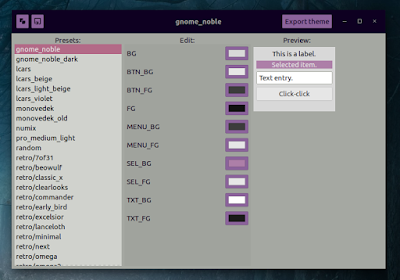
The tool features built-in presets, but it also allows changing theme colors individually, and it can even generate random themes. The themes generated using Oomox support GTK3, GTK2 and include Openbox and Xfwm4 themes.
Also, the latest Oomox 0.15, released a few days ago, includes initial support for Unity. Whats not included yet is the ability to change the Unity theme image colors and as a result, the window buttons color used by themes generated using Oomox wont change in Unity (so the default Numix color will be used for this).
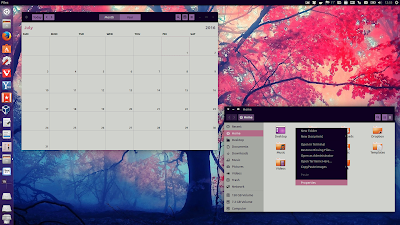 |
| Monovedek Oomox preset (Unity / Ubuntu 16.04) |
Note that Numix theme requires GTK 3.16 or newer, so the themes generated with Oomox require the same version.
As far as Ubuntu is concerned, Ubuntu GNOME, Xubuntu, Ubuntu MATE, Lubuntu and Ubuntu (with Unity) are supported. Since it requires GTK 3.16 or newer, than means you need to be using an Ubuntu 15.10 or 16.04 flavor for the themes to work.
An easier way to change theme colors would be GTK Theme Preferences but unfortunately, this tool no longer works with some themes. For instance, in Ubuntu 16.04, GTK Theme Preferences can change both GTK2 and GTK3 theme colors for Ambiance and Radiance themes, but it doesnt work with the Numix GTK3 theme.
Here are a few more screenshots featuring themes generated using Oomox:
 |
| Oomox Retro/Excelsior preset |
 |
| Oomox GNOME Noble preset |
 |
| Oomox Monovedek preset |
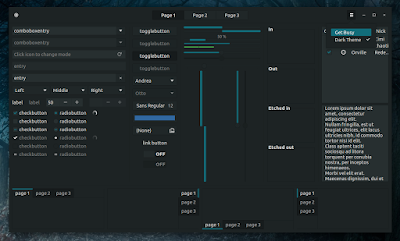 |
| Oomox Tizix Dark preset |
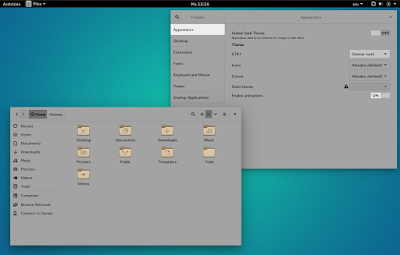 |
| Oomox Retro/Next preset (Ubuntu GNOME 15.10) |
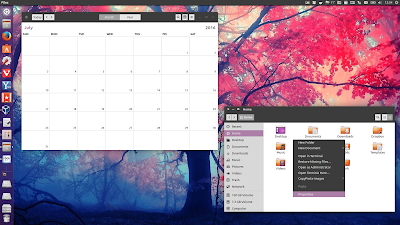 |
| Oomox GNOME Noble preset (Ubuntu 16.04 / Unity) |
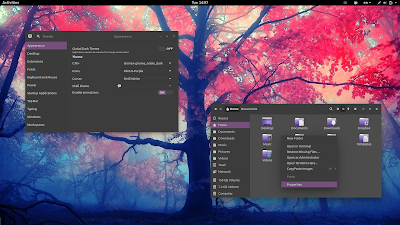 |
| Oomox GNOME Noble Dark preset (Ubuntu GNOME 16.04) |
Download and use Oomox
Update: Oomox is now available in the main WebUpd8 PPA, for Ubuntu 16.04 and 15.10 / Linux Mint 18. To add the PPA and install the tool, use the following commands:
sudo add-apt-repository ppa:nilarimogard/webupd8
sudo apt update
sudo apt install oomoxArch Linux users can install Oomox via AUR.
1. Install the required dependencies
Oomox requires python3-gobject as well as the following executables: glib-compile-schemas, gdk-pixbuf-pixdata and sass, while Numix theme requires the Murrine GTK2 engine. xorg-xrdb and xmllint are optional.
Install them in Ubuntu 15.10 or 16.04 using the following command:
sudo apt install python3-gi libglib2.0-bin libgdk-pixbuf2.0-dev ruby-sass libxml2-utils x11-xserver-utils gir1.2-gtk-3.0 gir1.2-glib-2.0 gtk2-engines-murrine2. Download and install Oomox
You can download Oomox from HERE.
To download Oomox and install it into /opt/oomox/, you can use the following commands:
sudo apt install wget
cd /tmp
wget https://github.com/actionless/oomox/archive/0.16.1.tar.gz
tar -xvf 0.16.1.tar.gz
sudo mkdir /opt/oomox
sudo cp -r oomox-0.16.1/* /opt/oomox/
Thats it.
To run the Oomox GUI, use the following command:
/opt/oomox/gui.shUsing Oomox is very simple - select the preset you want to use (and optionally change the colors if you want to make your own custom Numix theme) and click "Export theme":
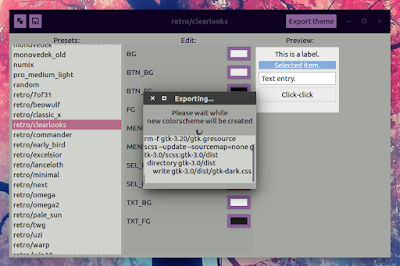
After the theme is generated, it should be available in the ~/.themes folder. You can use a tool like Unity Tweak Tool, GNOME Tweak Tool and so on to change the theme.
Report any bugs related to the generated themes to the Oomox GitHub page. If you think the bugs are Numix theme-related, report them to the Numix GTK Theme GitHub page.

Available link for download

Tuesday, December 20, 2016
Fix Large Black Borders Around Header Bar Apps With Some Themes In Ubuntu 15 10 GTK 3 16
Fix Large Black Borders Around Header Bar Apps With Some Themes In Ubuntu 15 10 GTK 3 16
In Ubuntu 15.10 (which uses GTK 3.16), theres a bug which causes some themes, like Numix, to have large black borders.
This bug only occurs for applications that use header bars (client-side decorations) and it affects Ubuntu (with Unity), while Xubuntu, Ubuntu MATE and Ubuntu GNOME dont seem to be affected (at least in my quick test). Update: MATE with Compiz enabled is also affected so I guess any desktop environment under which you use Compiz is affected (thanks to pawelp!).
Heres a screenshot with GNOME Clocks (an app that uses header bars) under Unity (Ubuntu 15.10), using Numix GTK theme:
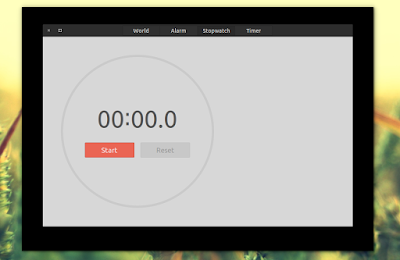
Im not sure when/if this bug will be fixed but until then, you can fix it yourself. Below youll find a simple fix which will remove the black borders no matter what GTK theme youre using.
To fix the large black borders bug in Ubuntu, open ~/.config/gtk-3.0/gtk.css (create the ~/.config/gtk-3.0 folder if it doesnt exist) with a text editor (Ill use Gedit below):
mkdir -p ~/.config/gtk-3.0
gedit ~/.config/gtk-3.0/gtk.css.window-frame {
box-shadow: none;
margin: 1px;
}This forces any theme you use to have a 1 pixel border. You can use any value you want - for instance, use "0" for borderless windows.
Then save the file and close all the applications affected by the black border bug (or you can log out and log back in), then try them again and you shouldnt see large black borders any more.
Heres the same application Ive used above to show the bug (GNOME Clocks, running under Unity), after applying the fix:
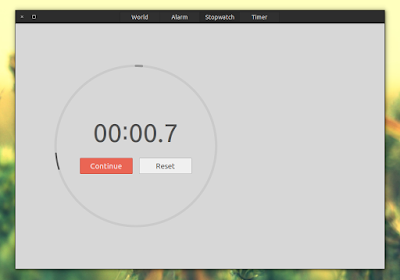
Thanks to Phaeilo @ GitHub for the fix!
Available link for download
Subscribe to:
Posts (Atom)