Showing posts with label xps. Show all posts
Showing posts with label xps. Show all posts
Wednesday, March 29, 2017
FREE Download DELL XPS 12 Users Guide Specifications PDF File
FREE Download DELL XPS 12 Users Guide Specifications PDF File
The DELL XPS 12 Users Guide has been released by asus at their website. The DELL XPS 12 Users Guide is provided in PDF document format (37-pages, PDF) that you can download directly from dell website. You can read this DELL XPS 12 Users Guide by using PDF reader software/application. The DELL XPS 12 Users Guide contains complete reference information about how to operate the DELL XPS 12 Tablet properly, such as how to use the hardware, how to charging your Tablet, docking the Tablet, Installing Sim Card, basic troubleshooting and many more.
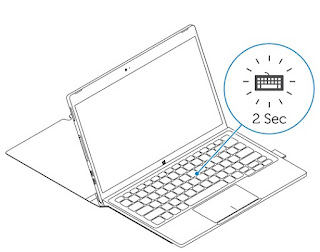
Table Contents:
1. Tablet features
2. Accessories
3. Setting up your tablet
4. Using your tablet
5. Entering BIOS setup program
6. Specifications
7. Troubleshooting
8. Getting help
9. Contacting Dell
10. Locating your Service Tag and Express Service Code
Tablet Features:

1. Microphones (2). Provides sound input for audio recording, voice calls, and so on.
2. Front camera-status light. Turns on when the front camera is in use.
3. Front camera. Allows you to video chat, capture photos, and record videos.
4. Volume-control buttons (2). Press to increase or decrease the volume.
5. microSD card slot. Insert a microSD card to expand the tablet’s storage capacity. Your tablet supports a microSD card with capacity up to 128 GB.
6. Micro-SIM card slot (optional). Insert a micro-SIM card to connect to a
mobile broadband network.
7. Thunderbolt 3 ports (USB-C)/charging ports (2). Supports USB 3.1 Gen 2, DisplayPort over USB-C, and Thunderbolt 3. Provides data transfer rates up to 10 Gbps for USB 3.1 Gen 2 and up to 40 Gbps for Thunderbolt 3. Connect a power adapter to provide power to your tablet and charge the battery.
8. Headset port. Connect a headphone, a microphone, or a headphone and microphone combo (headset).
9. Microphone. Provides sound input for audio recording, voice calls, and so on.
10. Rear camera. Allows you to video chat, capture photos, and record videos.
11. Windows button.
• Press to open the Windows Start screen.
• Press for quick access to the most recently used app or most recently
• Press to open the Windows Start screen.
• Press for quick access to the most recently used app or most recently
used screen.
12. Tablet-docking pins. Allows docking to the keyboard dock.
13. Service Tag label. Provides the Service Tag and Express Service Code needed for contacting Dell.
14. Security-cable slot. Connects a security cable to prevent unauthorized movement of your tablet.
15. Power button.
• Press to turn on the tablet if it is turned off or in sleep state.
• Press to turn off the screen.
Keyboard Features:

1. Keyboard-docking pins.
Allows docking the tablet here.
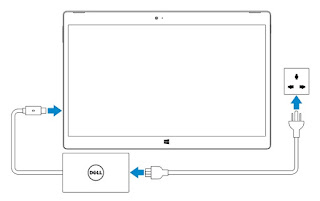
Charging the Tablet:
1. Connect the power cable into the power adapter.
2. Connect the power adapter to the power-adapter port on the tablet.
3. Connect the power adapter to an electrical outlet and charge the tablet until the battery is fully charged.
2. Connect the power adapter to the power-adapter port on the tablet.
3. Connect the power adapter to an electrical outlet and charge the tablet until the battery is fully charged.
Turning on your tablet:
When you turn on the tablet for the first time, you must finish Windows setup to start using your tablet. For more information, see the Quick Start Guide that shipped with your tablet.
1. Press and hold the power button for 2 seconds to turn on your tablet. The lock screen appears.
2. Swipe up your finger from the bottom of the display to switch to the login
screen, and then enter password to log in to Windows.
When you turn on the tablet for the first time, you must finish Windows setup to start using your tablet. For more information, see the Quick Start Guide that shipped with your tablet.
1. Press and hold the power button for 2 seconds to turn on your tablet. The lock screen appears.
2. Swipe up your finger from the bottom of the display to switch to the login
screen, and then enter password to log in to Windows.
For complete DELL XPS 12 Users Guide & Specifications PDF File , please click link below :
Download pdf file here:
DELL XPS 12 Users Guide & Specifications.pdf
Available link for download

Wednesday, March 1, 2017
Drivers Dell Adamo XPS Windows 7 64 Bit
Drivers Dell Adamo XPS Windows 7 64 Bit
Drivers Dell Adamo XPS Download For Windows 7 (64 Bit)
Application
- QuickSet ver 9.6.21,A07 Hard Drive 13.09.2010
Audio
- Realtek ALC269 HD Audio Sound Driver
Bios
- Pheonix Bios
CD/DVD
- TSST Firmware TS-D633A 9.5mm Slotload SATA DVDRW
Chipset
- Intel Mobile Chipset Drivers
- Intel AHCI Driver
Communication
- Broadcom Dell Wireless 705 GPS mini-Card Application
Input Device
- Synaptics TouchPad Driver
Network
- ALPS Bluetooth Driver UGPZ9XE61C
- Intel WiFi Driver Link 5300
- Intel WiFi Link 5100 Driver
- SMSC USB Lan9500 Driver
Video
- Intel GM45 Video Graphics VGA Display Driver
Available link for download
Sunday, February 12, 2017
FREE DELL XPS 12 9250 Support Drivers Download Windows 10 64 Bit
FREE DELL XPS 12 9250 Support Drivers Download Windows 10 64 Bit
Do you owner of DELL XPS 12 9250? Lost your Laptop drivers? No matter, download a new one here. Audio drivers, chipset, modem, video, network, wifi drivers, wirelless drivers, etc.. Here are the most recent drivers regarding DELL XPS 12 9250 products. Find the software for your Laptop here. This drivers support for Windows 10 64-Bit operating system. I hope can resolved your problem. Thank you.
