Monday, March 6, 2017
Ekstrak File zip tar gz tar bz2 di Linux
Ekstrak File zip tar gz tar bz2 di Linux
Beberapa waktu lalu sudah dibahas artikel tentang jenis-jenis kompresi data. Kali ini artikelku mengenai cara mengekstrak file-file yang terkompresi (zip, tar.gz dan tar.bz2) di Linux, menggunakan command line. Kok pake command line sih? Kan susah? Kalo pake GUI nenek-nenek pun bisa.. :P
Untuk mengekstrak file zip lakukan dengan command line seperti di bawah ini:
unzip nama_file.zip
File tar.gz bisa di-ekstrak dengan menggunakan command line di bawah ini:
tar -xzf nama_file.tar.gz
bisa juga pake
tar -xvzf nama_file.tar.gz
penambahan parameter -v adalah untuk menampilkan file-file yang diekstrak.
Untuk file tar.bz2 cara mengekstraknya ga jauh beda dengan file tar.gz. Cuma beda parameter. Caranya adalah seperti di bawah ini:
tar -xjf nama_file.tar.bz2
atau
tar -xvjf nama_file.tar.bz2
Selain parameter-parameter di atas, sebenarnya masih banyak cara mengekstrak file-file tersebut. Untuk lebih lengkapnya pake command andalan, yaitu man… :D
man unzip
man tar
Selamat mencoba… :)
Sumber : http://danigunawan.com/komputer/operating-systems/ekstrak-file-zip-targz-tarbz2-di-linux/
Available link for download

Friday, March 3, 2017
Fix Failed To Fetch Google Chrome Repository After Google Dropped Support For Its Browser On Linux 32bit
Fix Failed To Fetch Google Chrome Repository After Google Dropped Support For Its Browser On Linux 32bit

Failed to fetch http://dl.google.com/linux/chrome/deb/dists/stable/Release
Unable to find expected entry main/binary-i386/Packages in Release file (Wrong sources.list entry or malformed file)
Some index files failed to download. They have been ignored, or old ones used instead.
To fix this error on Ubuntu/Debian 64-bit, the repository must be specifically set for 64-bit only - this can be done by adding "[arch=amd64]" after "deb" in the /etc/apt/sources.list.d/google-chrome.list. To do this automatically, you can use the following command:
sudo sed -i -e s/deb http/deb [arch=amd64] http/ "/etc/apt/sources.list.d/google-chrome.list"Update: this file is changed on each Google Chrome update and it looks like theres no way around that (changing /opt/google/chrome/cron/google-chrome or /etc/default/google-chrome doesnt affect this) so until Google changes this in its package, youll need to apply the fix above after every Google Chrome update. If you have a solution for this, let us know in the comments!
Update 2: A workaround would be to make the .list file immutable, so it cant be changed by any Google Chrome updates, by using "sudo chattr +i /etc/apt/sources.list.d/google-chrome.list" (which can be reversed using: "sudo chattr -i /etc/apt/sources.list.d/google-chrome.list") but this is not ideal and you should change this file back once Google fixes this on their end.
Update 3: this bug was fixed upstream in version 49.0.2623.87 (thanks to Segio Rus for the comment!), so updating to Google Chrome 49.0.2623.87 should fix this issue.
sudo rm /etc/apt/sources.list.d/google-chrome.list
sudo apt-get remove google-chrome
Available link for download
Friday, February 24, 2017
Fed Up With the State of Linux
Fed Up With the State of Linux

On a server perhaps, where a low cost stable and flexible operating system like Linux absolutely shines. But The fact of the matter is, the Linux desktop is in an utterly abysmal state right now, and given the sheer amount of division within the GNOME camp, let alone the ludicrous number of other desktops and barely functional window managers, there is no solution in sight.
GNOME 3 was officially released in April of 2011 and ever since, Ive found myself, along with thousands of long time Linux users, a refugee, forced from my homeland (the venerable GNOME 2.30) and have not been a happy Linux user since. Ive turned to booting into OSX for the vast majority of my day to day computing activities, and even Windows 8, "modern" warts and all has managed to charm its way into my heart. And in the interest of full disclosure, for the most part I couldnt be happier.
The Ubuntu 12.04 partition on my desktop hasnt been booted into in months, since there is virtually nothing that Linux is capable of providing that cant be accomplished with OSX and MacPorts. For everything else, there is always VirtualBox.
The problem as I see it, is that when GNOME was planning the next version of their desktop, their vision did not mesh well with Canonicals plans to force feed Linux to the unwitting masses and thus Unity was born. Nobody wins, because both desktops suck to put it bluntly. They are bloated, awkward, clunky and unconfigurable.
Sure, it could be argued that neither Windows or OSX are terribly configurable either. And while that is somewhat true, the argument is an invalid one considering neither desktop were built on a legacy of customizability. The Linux desktop on the other hand, was. And ever since the release of GNOME 3, there has been a flood of conflicting and usually redundant effort to address the issues with GNOME 3 and its awkward interface and lack of configurability. The sheer number of GNOME 3 based desktops at the moment is indicative of a very unhappy community of users and developers. I mean honestly, Shell, Unity, Classic, MATE (stupid name!!!), Cinnamon, Pantheon, Consort... Things have gotten entirely out of hand.
In retrospect, when KDE4 first came out in 2007, it was an absolute disaster, but by the end of 2010, it had developed into a singular fantastic, albeit resource hungry desktop. And somehow KDE4 managed to do so without splitting into a half dozen side projects. Unfortunately, in that same span of time since GNOME 3 was released, the division between the various forks is the only thing that has steadily developed, with zero improvement on any particular front. Unity has gotten MORE resource intensive, not less. The fallback session is still as clunky as it was three years ago, and no effort whatsoever has been made to add configuration options to Shell. And dont get me started on MATE... It doesnt work on so many levels. I am used to GNOME, so when I hit alt+f2 and type in gnome-terminal and then nothing happens, my desktop is effectively broken. And why the hell is it called MATE? Named after a bitter, unfiltered tea consumed primarily in Central/South America, MATE violates the long standing naming convention of using acronyms (eg; GNOME = GNU Network Object Model Environment, KDE = K Desktop Environment, XFCE = X-Forms Common Environment, etc.). It may look deceptively similar to GNOME 2.30, but it is, in my eyes so thoroughly broken that it is completely unusable. I dont want to use "pluma" i want to use gedit, dammit! And Cinnamon is a completely unnecessary waste of time and resources that offers absolutely nothing that the fallback session doesnt, and it eats up massive system resources in the process.
My chief complaint though, is and always will be the fact that on both Shell and Unity, you cant even move the dock. Even Windows and OSX allow you to do that! Not only can the dock not be moved, but both Canonical as well as the upstream GNOME devs have actively worked against community efforts to add the ability to customize your desktop in any way. You cant even change your GTK, Metacity or Icon theme without installing hackish third party tools like Ubuntu Tweak. So unless you really like the default theme, eg; Adwaita, Ambience/Radiance, youre SOL my friend. Im sorry, but that is simply not an acceptable solution for me. This is not the operating system I came to know and love, and I expected better from Linux (insert canned response "You should ask for a refund" here). And thus taking the advice from one of the members of the Ubuntu Forums, I will be "voting with my feet". Im zeroing out my Linux partitions and reclaiming their valuable hard drive space to be used by more functional operating systems. Goodbye, and good luck. Hopefully GNOME eventually matures beyond this adolescent phase where it has to be "different" for the sake of being different, common sense be damned! I am reminded of all the angst-ridden, socially awkward, teenage Goth/Emo/Juggalo douche-bag idiots who loiter around Hot Topic stores in the mall and listen to God-awful music to prove to the world that theyre "different". Just remember, Hot Topic is owned by the GAP, and in reality no one cares how cool you think you are. What matters is what you can bring to the table, and right now the Linux desktop is not offering anything worthwhile.
GNOME is a complete and total disaster right now, and there is no sane and rational solution in sight.
KDE is slow, bloated, and its software selection sucks compared to GNOME. Despite all of its configurability it is still less aesthetically pleasing than any GTK based desktop. This is a matter of opinion, but I really dont care for the Oxygen theme at all, and all other themes are just plain ugly.
XFCE is like GNOME 2s pimply faced ugly younger cousin. Not only that, but over the years it has lost its allure of being a fast, lightweight DE. Its performance is only marginally better than GNOME.
LXDE, along with all of the *box and *WM DEs (E17 included), is nothing more than the lowest common denominator in the graphical user interface, lagging decades behind the rest of the computing world. I refuse to sacrifice usability and functionality in favor of speed.
Available link for download
Monday, January 30, 2017
Evernote Linux Client NixNote 2 Beta 5 Available For Download
Evernote Linux Client NixNote 2 Beta 5 Available For Download
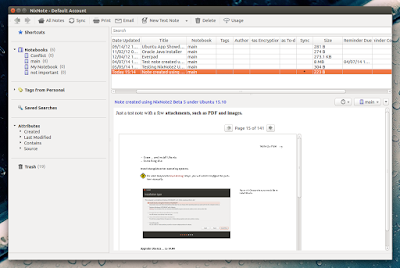
- added the ability to email notes;
- searching will now highlight PDF results;
- added Print Preview & the ability to only print selected text;
- notes that are marked as shortcuts are now visible in the tray icon;
- added the option to use notify-send instead of Qts popup notification;
- a colors.txt file can now be added to customize note background color options;
- various GUI enhancements.
- full synchronization of all notes and attachments;
- the ability to create, edit and delete notes, tags, notebooks and saved searches;
- the ability yo search notes and index attachments;
- allows using the image text recognition features provided by Evernote;
- supports multiple Evernote accounts.
- slightly different search syntax (NixNote allows any term to be negated, where Evernote does not);
- no Twitter, Facebook and LinkedIn sharing;
- audio notes are not directly supported (you cant record audio notes through NixNote but you can use a note recorded with a different app as an attachment);
- Ink notes cant be implemented in NixNote because Evernote doesnt provide an API for it.
Note: To enable syncing with Evernote, from the NixNote 2 menu select Tools > Synchronize and authenticate NixNote 2 with Evernote.
Download NixNote 2 beta
To download the NixNote 2 source, report bugs and so on, see its GitHub page.
Available link for download
Friday, January 20, 2017
FTP Server menggunakan VSFTPD di Linux Ubuntu Server 14 04 LTS
FTP Server menggunakan VSFTPD di Linux Ubuntu Server 14 04 LTS

- Masuk sebagai root
$ sudo su
- Lakukan penginstallan VSFTPD nya
# apt-get install vsftpd
- Lakukan backup konfigurasi terlebih dahulu
# cp /etc/vsftpd.conf /etc/vsftpd.conf.backup
- Setelah itu lakukan konfigurasinya
# nano /etc/vsftpd.conf
- Hilangkan tanda pagar untuk baris dibawah ini
write_enable=YES
local_umask=022
chroot_local_user=YES - Selanjutnya tambahkan baris dibawah ini
allow_writeable_chroot=YES
pasv_enable=Yes
pasv_min_port=40000
pasv_max_port=40100 - Lakukan restart untuk VSFTPD nya.
# service vsftpd restart
Available link for download
Thursday, December 22, 2016
Foxit PDF Reader Sees New Linux Release
Foxit PDF Reader Sees New Linux Release


If youre looking for an open source PDF reader that can open large PDF files quickly, check out MuPDF.
(click the "Free Download" link on the left and select Linux from the Platform drop-down).
Also see: Modify PDF Files In Linux With Master PDF Editor
Available link for download
FreeBSD vs Linux
FreeBSD vs Linux
I really wanted to like BSD. I tried my best, I got in there and dug in with both hands and installed FreeBSD 9 starting from a base install pulling down ports and compiling them. after many hours of tinkering, fixing errors and compiling package after package optimizing my system for the Atom architecture I finally had a bootable system that would bring up the GNOME desktop only to find that many things that work on virtually every other OS ive thrown at this netbook just dont work; things like my synaptics touchpad (cant turn off tap clicking no matter what I do), ACPI settings (wont wake on resume after I close the lid), and I cant enable compositing (using Metacitys compositing results in pegged CPU usage, and Compiz simply wont enable at all due to lack of a decent driver).
I dont like to give up on something, but those issues could have probably been overlooked or remedied in time, but FreeBSDs complete lack of anything like a Network Manager or WICD was the last nail in the coffin. To be fair, I did try to use wifimgr which is essentially a script based GUI for several iwconfig functions, but no matter what I did, if I tried to use it my wifi interface would crash. I could bring up the interface manually however provided I knew the SSID and security type of the network I was connecting to. Thats all well and good for at home, but this is a netbook not being able to connect to wireless networks on the fly is a deal breaker.
Good bye BSD. Maybe one day Ill use FreeBSD to run a home server (Lord knows I need one to administer file sharing and ssh to the outside world) but in encounter with FreeBSD on my netbook, however brief, Im not convinced of FreeBSDs potential as a desktop OS, at least not on ultra mobile devices like mine.
Im not trying to bash FreeBSD at all. My experience with the OS enlightened me to some concepts and design aesthetics that truly make a lot of sense logically. Linux is like a patchwork quilt of small applications built on top of a frequently updated monolithic kernel. BSD on the other hand is more like the foundation of a building, the kernel and all base applications are a cohesive unit which creates a substantially more stable system than Linux. Separate parts of the base system are not updated individually, instead the whole base system gets updated as a cohesive unit which leads to a much more standard platform to build upon and inherent stability and security benefits thereof. In theory, BSDs micro kernel architecture should be more efficient than the Linux kernel, but only time will tell whether one is superior to the other.
As I said, I tried really hard to like FreeBSD. I wanted to use it. I wanted to replace Linux with FreeBSD on my netbook, but unfortunately several of the amenities that make mobile computing possible on Linux just arent there for FreeBSD. I would have been happy if there were at least a network manager but there is not.
It looks like (for now at least) that Ill be going back to Linux on my netbook. Maybe Ill start with a base install of Debian and cherry pick packages to install. The bottom line is I became fed up with Ubuntu over a year ago and have limped along waiting for something better to come along, but in reality the only new developments are stop gap temporary solutions, most of which are offered by Linux Mint. As much as I tried to like MATE desktop, I simply dont foresee it lasting very long if for no other reason than the absolutely retarded naming of things. Cinnamon and MGSE seem to be redundant projects that attempt to accomplish the task of un-fucking the damage that Unity and Gnome Shell have done to desktop usability, and falling well short of the mark. I think that after the dust settles, the solution will be for the Gnome developers themselves to build up the Gnome fallback to reinstate all the functionality of Gnome 2.3x.
What I would like in reality, is a desktop that has all of the functionality and configurability of KDE4 that uses GTK. I am NOT a fan of using QT apps on Gnome or using GTK apps on KDE. Essentially what I want is Gnome2 on top of the modern kernel but that simply isnt going to happen.
Available link for download