Showing posts with label videos. Show all posts
Showing posts with label videos. Show all posts
Tuesday, January 31, 2017
Easily Backup Photos And Videos From Multiple Android And iOS Devices To Your Desktop With DAEMON Sync
Easily Backup Photos And Videos From Multiple Android And iOS Devices To Your Desktop With DAEMON Sync
DAEMON Sync is a tool created by the DAEMON Tools developers, which allows users to backup files from mobile devices to the desktop, over the local wireless network.
 |
| DAEMON Sync Android app |
The application is free to use but not free and open source software, and it consists of two parts: the server, which youll have to install on your computer, available for Linux (only deb files available), Windows and Mac OS X, and the mobile app, which runs on Android and iOS.
What makes DAEMON Sync both interesting and useful in various situations is that it requires pretty much no configuration and the data transfer is done on your local network (which is good for security/privacy reasons as well as transfer speed and the fact that you dont need a working Internet connection to use it), without using a third party server.
Also, the app allows backing up multiple devices to the same computer and you can browse the files that are backed up to your desktop from any of the devices connected to it via DAEMON Sync (you can choose which devices are allowed to do this).
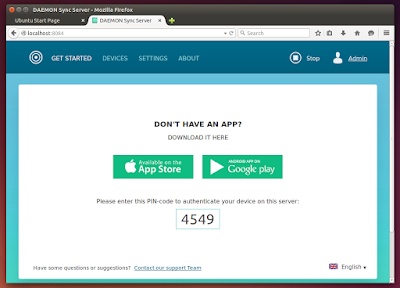 |
| DAEMON Sync desktop (server) app - authenticating device |
DAEMON Sync is more of a backup than a sync tool. Thats because it doesnt watch your files and continuously synchronize them and instead, it comes with a configurable sync interval which, by default, is set to 15 minutes (this can also be done on demand).
Furthermore, the only way to add files from your desktop to a mobile device via DAEMON Sync is to place them in a directory named "Sync Folder", which the app creates both on your mobile and desktop and it cant be changed.
However, according to the developer comments posted on Google Play, two-way sync is currently under development so it should be available at some point in DAEMON Sync.
 |
| DAEMON Sync desktop (server) app - devices |
Think of DAEMON Sync as an easy way to backup your familys phone videos and photos to a single desktop computer, with access to all of them from each mobile device that was paired with the DAEMON Sync Server app, even without an Internet connection (as long as youre connected to the local network, obviously).
If you want more flexibility and options, including being able to sync files across multiple desktops, etc., BTSync and Syncthing along with "traditional" solutions like Dropbox are the obvious choices, but for an easy photo/video mobile to desktop backup solution that runs on your local network and doesnt need an Internet connection to work, DAEMON Sync does the job pretty well.
Install Daemon Sync
Download DAEMON Sync (available for Linux: 32 and 64bit deb, Windows and Mac OS X / iOS and Android)
To use DAEMON Sync, youll need to install the iOS / Android app on your mobile device and the server application on your Linux, Mac OS X or Windows computer.
Note: the .deb is pretty badly packaged, thats why you wont be able to install it using GDebi - use Ubuntu Software Center, dpkg via the command line, etc. to install it. Also, once you install it, you wont find DAEMON Sync in the menu however, you should find a shortcut on your desktop. You can also access it directly by typing "localhost:8084" in a web browser.
Its also important to mention that on Linux, the default storage folder is "/media/DAEMONSyncStorage/", and inside this folder youll find "Sync Folder" which allows you to easily sync files back to your mobile device. This folder can only be modified by root, so you should change its permissions (for instance, you can change owner using chown: "sudo chown sudo chown -R $USER "/media/DAEMONSyncStorage". Hopefully this will be fixed in a future DAEMON Sync release.

Available link for download

Sunday, December 4, 2016
Free Top Online Animation Videos Maker Tools 2015
Free Top Online Animation Videos Maker Tools 2015
Animation video making is not an easy job. If you want to create short animation video for your website or YouTube channel, then you may cost lots of money. But now-days you can create self made animation videos without any cost. There is a free top online video maker tools helps to create free animation videos.

1. GoAnimate
GoAnimate is a very popular cartoon animation maker tools to create free videos and no need to any special video making knowledge.
2. Wideo
Wideo video maker tools provide to create professional animation just a few seconds.You can also place your logos and images on videos.
3. Powtown
Powtown is also good online animation video maker tools for your crate your business videos without any cost.
4. Moovly
Moovly is another option for making animated videos online free.
5. Animaker
Animaker is a good cartoon maker tools. Just add your own template and make a stylish videos.
Incoming Search Terms:
free animation video maker, animation video maker online, animation video maker free, animation video maker tools, animation tools, online video maker, animation tools 2015, best animation tools, top free animation maker tools.
Available link for download
Subscribe to:
Posts (Atom)