Showing posts with label style. Show all posts
Showing posts with label style. Show all posts
Tuesday, December 27, 2016
Emoji warna iOS Apple style untuk Android KitKat
Emoji warna iOS Apple style untuk Android KitKat
Android KitKat memang sudah mendukung emoji tapi tampilan emojinya kurang menarik, tidak seperti emoji yang ada di iOS ataupun di Whatsapp. Berikut cara mengganti emoji Andoid KitKat jadi seperti di iOS.
Trik ini untuk OS KitKat, untuk dibawah KitKat tidak bisa, diatas KitKat saya belum coba.


<family>
<family>
Hasilnya eperti ini :
b. Kembali ke root explorer tekan dan tahan /sytem/etc/font.xml. Pilih permission seperti langkah nomor 3 dan set ownership sepertilangkah nomor 4.
Trik ini untuk OS KitKat, untuk dibawah KitKat tidak bisa, diatas KitKat saya belum coba.
Berikut cara mengganti emoji :
1. Perangkat dalam keadaan root. Jika belum silahkan baca Cara root android tanpa komputer.
2. Instal Aplikasi Root Browser silahkan instal dari playstore, bisa memakai Root Explorer Pro "berbayar" atau Root Browser "gratis".
3. Unduh font emoji, salin AppleColorEmoji.ttf ke /system/fonts.
Tekan dan tahan lalu pilih Set Permission , item yang dicentang seperti gambar berikut :
Tekan dan tahan lagi pilih ownership owner=root, group:root.
4. Buka root explorer buka apada direktori /system/etc. Cari file font.xml bila ada lakukan ikuti langkah A. Bila tidak ada ikuti langkah B.
Langkah A :
a. Buka root explorer buka pada direktori /system/etc tekan dan tahan font.xml lalu pilih open in text editor.
cari kode
<family>
<font weight="400" style="normal">NotoSansSymbols-Regular-Subsetted.ttf</font>
</family>
kemudian tambahkan kode dibawah ini diatasnya kose diatas.
<family>
<font weight="400" style="normal">AppleColorEmoji.ttf</font></family>
<family>
<font weight="400" style="normal">AppleColorEmoji.ttf</font></family>
<family>
<font weight="400" style="normal">NotoSansSymbols-Regular-Subsetted.ttf</font>
</family>
Simpan kemudian keluar.
b. Kembali ke root explorer tekan dan tahan /sytem/etc/font.xml. Pilih permission seperti langkah nomor 3 dan set ownership sepertilangkah nomor 4.
c. Reboot. Untuk lihat hasilnya ada di akhir artikel.
<family>
<fileset>
<file>AndroidEmoji.ttf</file>
</fileset>
</family>
<fileset>
<file>AppleColorEmoji.ttf</file>
</fileset>
</family>
sehingga hasilnya seperti dibawah ini

Langkah B :
a. Buka Root explorer, edit /system/etc/fallback_fonts.xml, tekan dan tahan pilih Open with text editor.
Cari kode
<family>
<fileset>
<file>AndroidEmoji.ttf</file>
</fileset>
</family>
Tambahkan kode berikut diatasnya
<family> <fileset>
<file>AppleColorEmoji.ttf</file>
</fileset>
</family>
sehingga hasilnya seperti dibawah ini
b. Tekan dan tahan /system/etc/fonts.xml . Atur permission dan ownership seperti no 3.
c. Reboot.
Mengetes apakah berhasil?
Buka situs getemoji.com.


Mengetes apakah berhasil?
Buka situs getemoji.com.
Tampilan emoji asli
Tampilan emoji setelah pakai trik diatas.
8. Bila keyboard tidak medukung emoji, bisa instal emoji keyboard di playstore.
Selamat mencoba.
Kredit: Angelsel - XDA
Available link for download

Friday, November 18, 2016
Fly IQ4418 ERA Style 4 Pc Suite And Usb Driver Free Download
Fly IQ4418 ERA Style 4 Pc Suite And Usb Driver Free Download
Fly IQ4418 ERA Style 4 Pc Suite And Usb Driver Free Download
Here is a free Usb Drivers and Pc Suite Fly IQ4418 ERA Style 4. Make sure you have the correct type model your smartphone before downloading the Usb Driver and Pc Suite device to your computer. For how to download and install the Usb Driver, Pc Suite Com port and Modem do this tutorial, please you can directly see below.
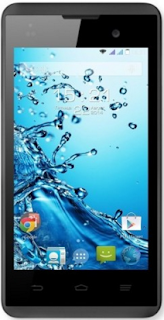
Model Type : Fly IQ4418 ERA Style 4 Smartphone
Package Included : Fly IQ4418 ERA Style 4 Usb Driver, Pc Suite, Com port, Modem
Supported Os : Windows Xp / Vista / 7 / 8 / 32 bit & 64 bit
File Size : 9.09Mb
Fly IQ4418 ERA Style 4 Usb Driver and Pc Suite to Install tutorial :
Note : Keep in mind that if your Fly IQ4418 ERA Style 4 Usb Driver and Pc Suite smartphone powered by Mtk processor you use, here will be discussed and a tutorial on how to install the Usb and Pc Suite drivers for this model.
Warning : Run as administrator if you are using Windows Xp, Windows Vista, Windows 7 and Windows 8 in order for the Fly IQ4418 ERA Style 4 Smartphone Usb Driver and Pc Suite to work properly.
Please skip the instructions below if device you are using is not supported by Mtk Cpu :
- Enable Usb Driver and Pc Suite debugging immediately on Fly IQ4418 ERA Style 4 Usb Driver and Pc Suite to do that you go to Settings> Developer Options.
- This Usb Driver and Pc Suite download for you to use the computer (for the download link provided at the end of this article you can directly download), extract the files downloaded earlier using WinZip or WinRAR, locate the file (PdaNetA4150.exe) and launch it (only in case be sure to close all programs that run on your computer). Download here Usb Driver and Pc Suite
- Select the model you are using a Fly IQ4418 ERA Style 4 Smartphone, then you press the button to install it. Now its time to connect the Usb Driver and Pc Suite you are using, there will be a popup message saying that the phone you are using now connected. Congratulations you have completed the installation.
Well, it was a glimpse of the review and how to download and install it step by step in Usb Driver and Pc Suite Fly IQ4418 ERA Style 4 Smartphone you use, thank you visit, use his congratulations and success.
Available link for download
Subscribe to:
Posts (Atom)